Optimize Live > Installation > Advanced installation
Learn how to install the StormForge Agent in more advanced scenarios such as using a proxy server or a private repository
2 minute read
A recommendation includes the CPU and memory requests and limits values (and recommended HPA configuration, if an HPA is running) that the machine learning has determined to be optimal for each container in a workload.
By default:
To understand how a recommendation will right-size a workload, review the workload details page header:
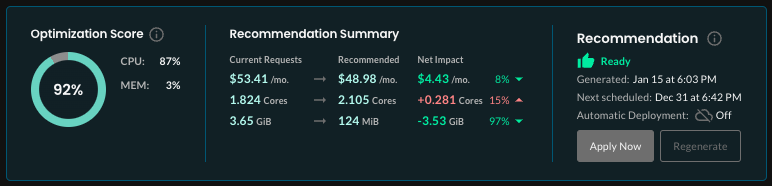
Optimization Score measures how well your current request settings align with Optimize Live’s recommendations. A score of 100 indicates perfect alignment.
Recommendation Summary
Current Requests shows the current requests multiplied by the average number of replicas over the last 7 days.
Recommended shows the recommended requests multiplied by the average number of replicas over the last 7 days.
Net Impact shows the difference between the current and recommended total CPU and memory requests.
Note: To change the CPU and memory cost/hr values used to calculate the estimated monthly costs, click Settings in the upper-right corner of the page.
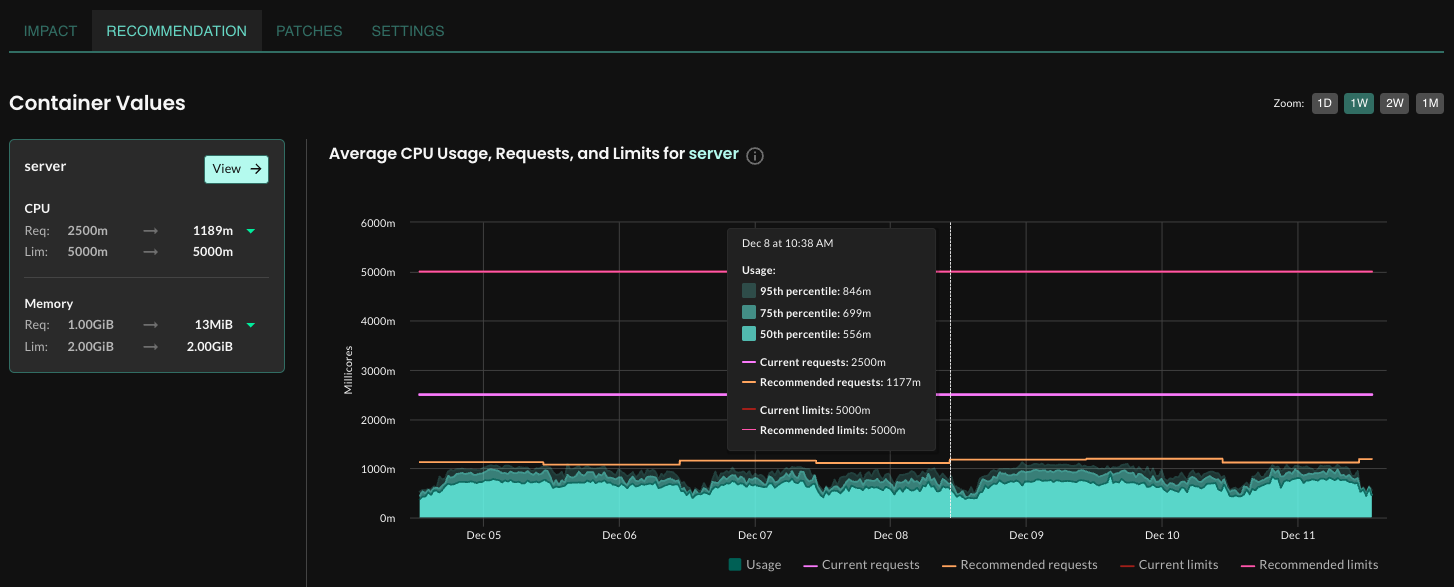
To view the recommended CPU and memory settings for each container in a workload, navigate to a workload details page, click Recommendation, and then click View beside a container name in the Container Values section.
The container-level charts show the projected impact of using the recommended settings, averaged across the time period shown on the graph. Hover at any point on the graph to see details for a point in time.
Run the following command, replacing WORKLOAD_NAME with your workload name:
$ stormforge get recommendations WORKLOAD_NAME -o json
Here’s an excerpt from the recommendation:
"goal": "savings",
"values": {
  "containerResources": [
    {
      "containerName": "respod",
      "requests": {
        "cpu": "0",
        "memory": "1099366"
      }
    }
  ],
  "autoScaling": {
    "metrics": [
      {
        "resource": {
          "name": "cpu",
          "target": {
            "averageUtilization": 90
          }
        }
      }
    ]
  }
}
Learn how to install the StormForge Agent in more advanced scenarios such as using a proxy server or a private repository
Apply recommendations using the method that suits your environment
You can generate recommendations outside of a schedule